
Salesforce
Self-Service
Assessment Tool
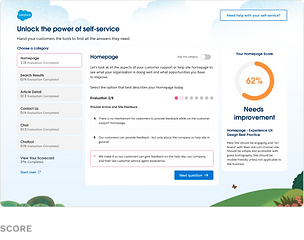
I designed the interface and visual system for Salesforce’s self-service assessment tool—an interactive experience that guides users through structured questions about their website and delivers a clear, actionable scorecard grounded in best-practice insights.

ROLE
Visual / UI Designer
TEAM
Creative Director, UX Designer, Developers
TIMELINE
2024 · 2 months · Live
TOOLS
Figma, Jira
AGENCY
Launch Interactive
THE CHALLENGE
Self-Service Without Direction
Salesforce customers wanted their help sites to do more: cut support costs, answer questions faster, keep customers happy. But knowing what to fix meant digging through scattered guides and articles, or getting a Salesforce expert on a call. Teams couldn't tell where they stood, or where to start.
FRAGMENTED

STRUCTURED


THE SOLUTION
A Repeatable Decision Framework for Self-Service Maturity
Instead of static guidance, the tool functions as a reusable evaluation framework — translating qualitative inputs into clear scores, priorities, and next actions.
THE EXPERIENCE
From Evaluation to Action
Teams move through a guided assessment, receive scored feedback, and walk away with prioritized next steps.



DESIGNED FOR EVERY SCREEN
The Same Assessment,
Any Device
The evaluation experience was built to work as well on a phone as on a desktop — same questions, same live scoring, same scorecard output. No compromises.
OUTCOMES
Built for Adoption at Any Scale
Categories evaluated
6
Best practices built into the scoring
22
best practices built into the scoring.
3
Shipped in 2 months.
Took over UX mid-project when the UX designer left and carried it through launch.
Designed it so teams could self-diagnose without booking a Salesforce expert.
DESIGN TRADEOFF
CHOSE
Prioritized
over
TRADED AWAY
Complete
Every score could have come with a full list of best practices. Instead, each one surfaces just 3 recommendations — trading completeness for a clear first move.


